
AI-Ready SharePoint:
How to Prepare Your
Business Content for Copilot and Intelligent Agents
A practical guide to preparing SharePoint content, permissions, metadata and governance so AI can work with business information more effectively.
Executive Summary
Microsoft
Copilot and SharePoint agents can help employees discover information,
summarize documents, answer questions and work with organizational knowledge.
But AI is only as useful as the business content it can safely and accurately
use.
AI readiness is therefore not just about
switching on an AI feature. It
is about making content current, structured, discoverable, properly
permissioned and governed so that people and AI can work from trusted information.
The goal: turn
SharePoint from a collection of files into a reliable knowledge foundation for
Copilot and intelligent agents.
What Does “AI-Ready SharePoint” Really Mean?
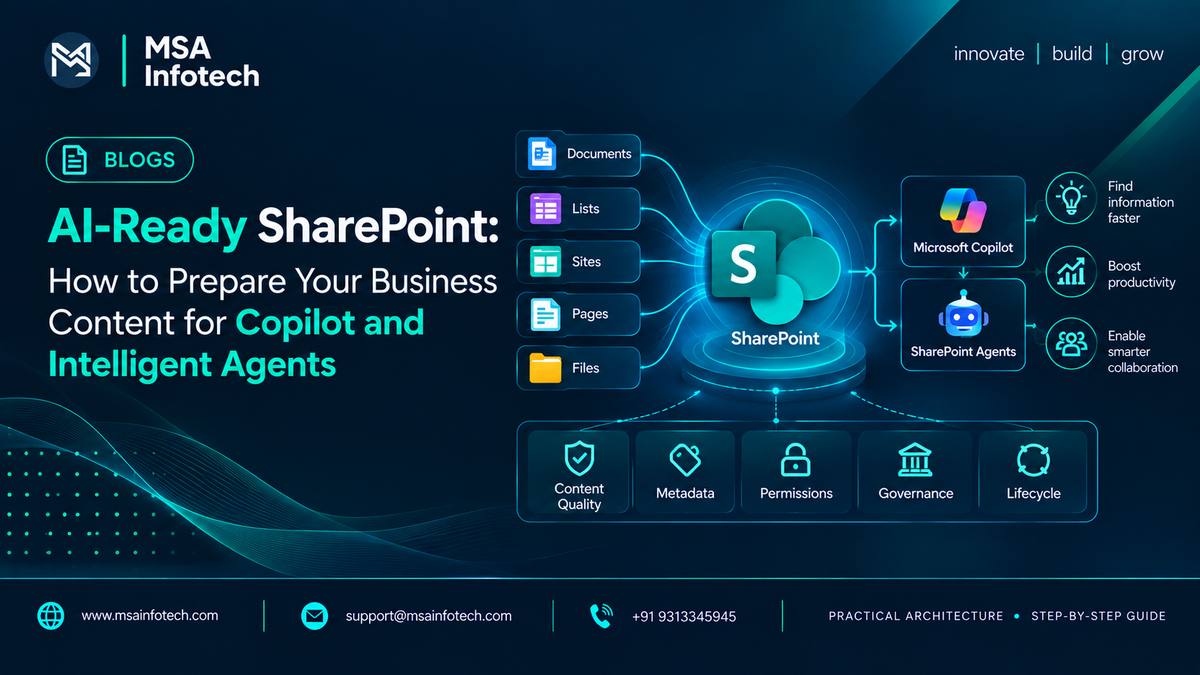
An AI-ready
SharePoint environment is one where business information is organized and
governed well enough to support useful AI experiences. This includes the
quality of the content itself, how it is classified, who can access it, and
whether outdated information is identified and managed.
·
Content
is current, relevant and owned by the right people.
·
Documents
and pages have meaningful names, structure and metadata.
·
Users
have appropriate permissions to the information they need.
·
Sites
and libraries follow understandable organizational standards.
·
Outdated,
duplicate and unnecessary content is reviewed or retired.
·
Governance
policies support secure use of Copilot and agents.
Why Content Quality Matters More in the AI Era
Traditional
search often requires employees to find the right keyword, file or location.
AI-based experiences can synthesize information across permitted content and
present an answer in natural language. That makes content quality and context
increasingly important.
If the underlying content is outdated,
duplicated or poorly structured, AI cannot magically turn it into reliable
business knowledge.
Microsoft
recommends preparing SharePoint and OneDrive content for Copilot and agents by
improving content management, lifecycle practices, access controls and
governance. These practices help reduce the risk of irrelevant information and
accidental oversharing.
Start With a Content Health Check
Before
introducing AI broadly, review the content that employees and agents may rely
on. The objective is not to clean every file at once; it is to identify the
areas that matter most to business operations.
·
Identify
inactive sites and libraries.
·
Find
duplicate or outdated documents.
·
Review
content owners and business purpose.
·
Identify
sensitive or high-risk information.
·
Check
whether important content has consistent metadata.
·
Prioritize
high-value sites and repositories for cleanup.
Practical approach: start with content that is frequently
used for policies, customer work, projects, HR, finance, operations and
decision-making.
Organize Content So People and AI Can Understand It
Information
architecture remains the foundation. Sites, libraries, pages and metadata
should reflect how the organization actually works.
|
Layer |
Purpose |
Example |
|
Business
Function |
Groups
information around a clear business purpose. |
HR,
Sales, Operations |
|
SharePoint
Site |
Provides
a focused collaboration or publishing workspace. |
HR
Site, Project Site |
|
Library
/ List |
Stores
structured information for a specific need. |
Policies,
Contracts, Projects |
|
Metadata |
Adds
context that supports filtering, discovery and classification. |
Department,
Document Type, Year |
|
Permissions |
Defines
who can access the information. |
HR-only,
Project members |
Use Metadata to Add Business Context
Metadata helps
describe what a document is, who owns it, what department it belongs to, how
long it is relevant and how it should be used. Good metadata can make content
easier to filter, classify and maintain.
·
Document
Type — Policy, Contract, Proposal, Report
·
Department
— HR, Sales, Finance, Operations
·
Business
Process — Recruitment, Procurement, Customer Onboarding
·
Status
— Draft, Active, Archived
·
Review
Date — when content should be reviewed
·
Owner
— the person or team accountable for the content
Keep metadata practical. Too many mandatory fields can reduce
adoption and encourage users to enter low-quality information.
Permissions: AI Should Not Expand Access
One of the most
important principles of AI-ready SharePoint is that AI should work within
existing access controls. SharePoint agents use information from sources the
user can access; if a user does not have permission to specific content, the
agent should not use that content for the user's response.
This means security must
be designed before scale. Review
broad sharing, anonymous or unnecessary access, inactive users, group
membership and sensitive libraries before expanding AI usage.
Microsoft's
guidance emphasizes preventing accidental oversharing and reviewing access
because Copilot and agents can make previously difficult-to-discover
information easier to retrieve.
Manage the Content Lifecycle
Content that
was useful three years ago may not be useful today. A growing SharePoint
environment needs a lifecycle approach so information remains relevant.
Create → Review → Maintain → Archive → Retire
Assign ownership
and review dates for important content. Use site lifecycle and archiving
practices where appropriate, and make retirement part of normal content
management rather than an occasional cleanup exercise.
Prepare Content for Copilot and SharePoint Agents
Once content is
organized and governed, teams can identify practical AI use cases. SharePoint
agents can work with selected sites, pages, lists, libraries and files as
knowledge sources, depending on the experience and configuration.
|
Use Case |
Example |
|
Knowledge discovery |
Answer
questions about approved project, policy or department content. |
|
Document understanding |
Summarize
selected documents or compare relevant files. |
|
Project support |
Help
teams locate project information and key documents. |
|
Employee self-service |
Help
employees find approved HR or company information. |
|
Content assistance |
Support
drafting, FAQs and other content tasks based on trusted sources. |
Common Mistakes That Reduce AI Readiness
·
Turning
on AI before reviewing high-value content and permissions.
·
Keeping
multiple versions of the same business document.
·
Creating
sites without clear owners or purpose.
·
Using
inconsistent metadata and naming standards.
·
Giving
users broad access because it is easier to administer.
·
Treating
content cleanup as a one-time project.
·
Creating
AI use cases without defining which sources should be trusted.
A Practical AI-Readiness Checklist
·
✓ Important SharePoint sites have clear
owners.
·
✓ High-value documents have clear purpose
and current versions.
· ✓ Metadata is useful and consistently
applied.
·
✓ Sensitive content has appropriate
permissions.
·
✓ Inactive sites and stale content are
identified.
·
✓ Content lifecycle and review practices
are defined.
·
✓ Users can find important information
through navigation and search.
·
✓ AI use cases have clearly defined
knowledge sources.
· ✓ Teams understand that AI follows the permissions of the content it can access.
Frequently Asked Questions
What is AI-ready
SharePoint?
It is a
SharePoint environment where business content is organized, current,
discoverable, appropriately permissioned and governed so it can support useful
AI experiences.
Does Copilot automatically
clean up SharePoint content?
AI capabilities
can assist with content management tasks, but organizations still need clear
ownership, lifecycle practices and governance.
Can SharePoint agents
access restricted documents?
Agents work
within the user's permissions. If the user cannot access a source, that
restricted content should not be included in the user's response.
Should we clean all
SharePoint content before using AI?
Not
necessarily. A practical approach is to prioritize high-value sites, sensitive
content and information that will be used for important AI scenarios.
What is the first step
toward AI-ready SharePoint?
Start with a
content and access assessment: identify important repositories, owners, stale
content, sensitive information and permission risks
How MSA Infotech Can Help
Preparing
SharePoint for AI is a combination of content strategy, information architecture,
governance, security and implementation. Organizations often need more than an
AI feature—they need a practical plan for improving the environment behind it.
MSA Infotech's
SharePoint capabilities can support organizations with SharePoint implementation
and customization, migration, integration, workflow automation, data and
analytics, and ongoing support. The objective is to build a SharePoint
environment that is structured for today's collaboration needs while creating a
stronger foundation for future AI-enabled experiences.
Explore MSA Infotech
SharePoint services: msainfotech.com/share-point-development
Conclusion
AI-ready
SharePoint starts with the fundamentals: trusted content, clear structure,
useful metadata, appropriate permissions and consistent governance.
Copilot and intelligent agents can make organizational knowledge easier to work with, but the quality of their results depends heavily on the quality and accessibility of the information behind them. Businesses that prepare their SharePoint environment today can create a stronger foundation for secure, scalable AI adoption tomorrow.
MAKE YOUR SHAREPOINT CONTENT READY FOR THE NEXT GENERATION OF AI.